A broken M3U8 player is rarely solved by guessing. The same visible symptom can come from different layers. A player that says nothing may have failed to fetch the first manifest. A player that shows a quality level but never starts may have failed on a child playlist, media segment, encryption key, or initialization segment. A stream that works in a desktop player but fails in a web page may be running into browser-only rules such as CORS or mixed-content blocking.
The goal is not to memorize every HLS error string. The goal is to isolate where the chain stopped. Once you know that, the fix becomes much narrower: correct a URL, refresh a token, adjust a CDN rule, add response headers, choose a compatible codec, or use the right playback mode.
Reference playback and diagnostic evidence
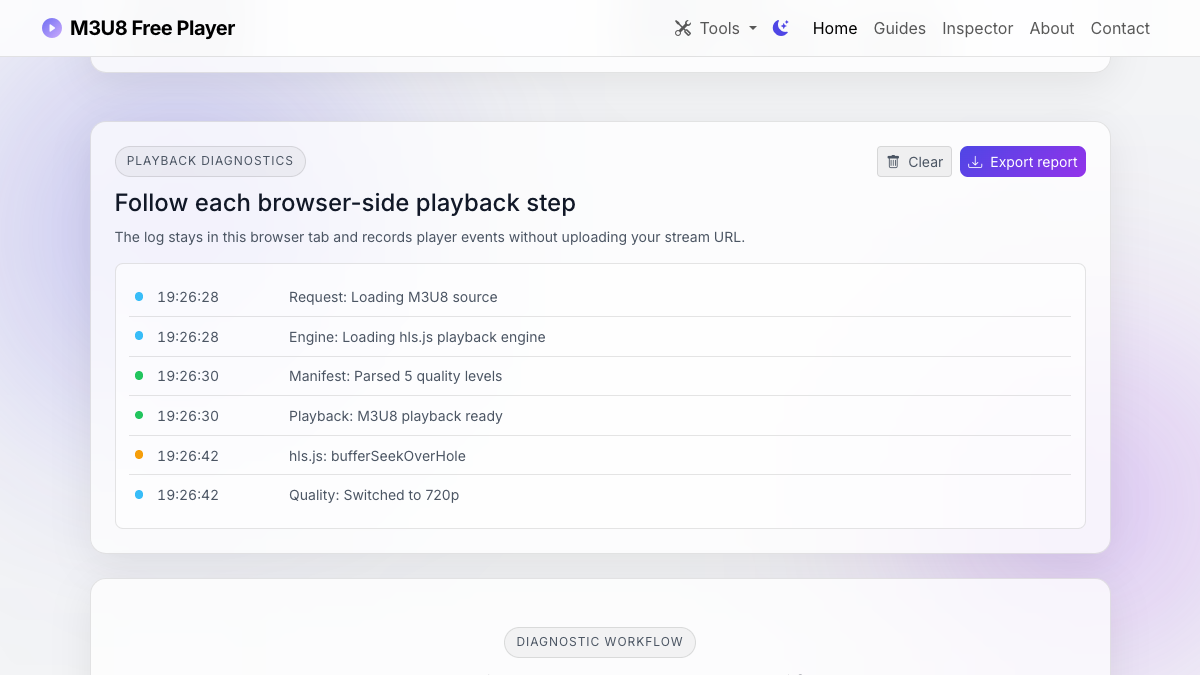
We loaded the public Mux HLS sample in the homepage player and captured the browser-side sequence exposed by this project: engine load, manifest parse, available quality levels, selected resolution, and playback readiness. The same URL's master playlist returned HTTP 200 and parsed into five variants. That provides a known-good baseline before testing a failing stream.
Quick triage checklist
Open the browser network panel before pressing play. Clear previous requests, reproduce the failure once, then look for the first red request or the first request that returns unexpected content. Do not start by changing player options until you know whether the browser actually received the manifest.
| Where it fails | Likely cause | Best next check |
|---|---|---|
| First M3U8 request | Bad URL, expired token, CORS, mixed content, redirect, or server error | Open the manifest request and inspect status, headers, and response body. |
| Child playlist | Relative path issue, CDN rewrite, missing rendition, or token mismatch | Inspect the master playlist and resolve the child URL manually. |
| Media segment | Segment 404, CDN cache miss, blocked origin, missing range support, or stale playlist | Compare segment hostnames and response codes over several segment requests. |
| Encryption key | Key URL blocked, token missing, or key origin lacking CORS headers | Search for #EXT-X-KEY and test the key URI under browser rules. |
| Decode stage | Unsupported codec, unsupported container, or incompatible audio track | Compare codec strings with the browser and device you are testing. |
1. The manifest never loads
If the first .m3u8 request fails, the player cannot discover anything else. Check the request URL first. Copy it from the network panel, paste it into a new tab, and confirm that it returns playlist text starting with #EXTM3U. If it returns HTML, JSON, a login page, or an error page, the player is not receiving an HLS manifest even if the URL ends with .m3u8.
Status codes matter. A 403 often points to authentication, token expiry, referer rules, geo restrictions, or WAF behavior. A 404 points to a missing path or stale manifest URL. A 301 or 302 is not always wrong, but redirects can change origins, protocols, and relative URL resolution. A request that appears as blocked or status 0 in the browser often points to CORS, mixed content, extensions, or a network policy rather than an HLS syntax problem.
2. The stream works elsewhere but not in the browser
This is the classic web HLS trap. Desktop players and command-line tools are not bound by the same cross-origin checks as a JavaScript player running in a web page. If a manifest works in VLC but fails in a browser player, compare the response headers. The manifest, child playlists, media segments, subtitles, and key files may all need compatible CORS headers because the browser does not stop checking after the first request succeeds.
Also check HTTPS. A secure page cannot safely load an insecure stream URL in normal browser conditions. If your site is served over HTTPS and the stream is plain HTTP, the request can be blocked before the HLS player has a chance to parse the response.
3. The master playlist loads, but variants fail
A master playlist can look healthy while one rendition is broken. Inspect the #EXT-X-STREAM-INF entries. Each one describes a variant and points to a child playlist on the following line. Resolve those child URLs relative to the master playlist URL and test them directly. If one child playlist fails, auto quality selection may choose it and make the whole stream appear broken.
- Check whether every child playlist URL is reachable from the browser.
- Check whether variant bandwidth and resolution values make sense.
- Check whether codec strings are present and accurate.
- Check whether audio or subtitle groups reference separate playlists on different hostnames.
4. Segments fail after the playlist loads
If the player sees the playlist but video never begins, look at segment requests. Segment failures often reveal CDN, storage, token, or path issues. A live playlist may reference only a moving window of recent segments, so a stale playlist can point to segments that have already been removed. A VOD playlist should be more stable, but packaging or upload errors can still leave gaps.
Segment request patterns also tell you whether the player is making progress. If only the first segment fails, inspect that URL and response. If several segments load and then later ones fail, look for token expiry, cache inconsistency, or live-edge drift. If segments load but decode fails, move to codec and container checks.
5. Encrypted streams can fail on key requests
Encrypted HLS adds another dependency. The playlist may include a line such as #EXT-X-KEY:METHOD=AES-128,URI="key.bin". The key URL must be reachable under the same browser conditions as the manifest and segments. If the key is blocked by CORS, authentication, or a short-lived token, the player can download playlist text and media bytes but still fail to decrypt the content.
Do not expose private keys publicly just to make a test pass. Fix the access rule deliberately. If the stream requires authorization, design the authorization flow so the manifest, child playlists, segments, and keys all share a consistent lifetime and access model.
6. Network success does not guarantee decode success
Once requests are green, codec support becomes the next suspect. HLS can carry different video and audio formats, and browser support is not identical across devices. A stream using H.264 with AAC audio is more broadly compatible than a stream using a less supported video codec or an audio codec a target browser cannot decode. If your manifest declares codecs, read them. If it does not, use the player error, media inspector tools, or packaging logs to identify the actual media.
Codec problems often look confusing because the network panel appears healthy. The player may buffer bytes but never render frames, or it may fail only on one browser. That is why the workflow should separate network reachability from media compatibility.
7. Live playlist behavior can look like a bug
Live HLS playlists change over time. They usually do not end with #EXT-X-ENDLIST while the event is active. They include a media sequence number and a window of recent segments. If the server stops publishing updates, publishes slowly, or removes segments too aggressively, the player can drift behind or chase segments that are no longer available.
For live streams, check whether the playlist updates at a reasonable cadence, whether target duration matches segment timing, and whether CDN cache rules are too sticky. A cached live playlist can make every player request the same old segment list while the origin has already moved forward.
Decision tree for the next fix
- If the first manifest request fails, fix URL, status, token, protocol, redirect, or CORS first.
- If the master playlist loads but variants fail, inspect child playlists and their hostnames.
- If segments fail, check path resolution, segment availability, cache behavior, and token lifetime.
- If key requests fail, fix key authorization and CORS without making private keys broadly public.
- If all requests succeed but playback fails, compare codec and container support on the target browser.
- If only live playback fails, inspect playlist refresh behavior, target duration, media sequence, and CDN caching.
Use the site tool to reproduce the failure
Paste the stream into the homepage player and use the Inspect button first. If inspection succeeds, compare the manifest summary with the player behavior. If inspection fails, the browser already cannot fetch the manifest, so the next step is headers, status, and access policy. The tool is intentionally browser-based because that is the environment where web playback has to succeed.
After you fix the suspected layer, test again in the same browser and then in at least one other target browser. Keep the network panel open until you see manifest, child playlist, segment, and key requests behave consistently.
Authoritative troubleshooting references
- hls.js API documentation defines the manifest, level, network-error, and media-error events used in the on-page log.
- IETF RFC 8216 defines master playlists, media playlists, media sequences, target duration, keys, and end lists.
- MDN's CORS guide explains the browser-only access checks behind many status-0 and blocked-request failures.