The most useful moment to inspect a manifest is before you change player code. Many HLS playback issues are not caused by the video element, the JavaScript library, or the page layout. They come from the playlist itself: a missing child playlist, a codec string the browser cannot decode, a key URI on a blocked origin, a live playlist without an expected update cadence, or a segment path that resolves differently after a CDN redirect.
The M3U8 Manifest Inspector in this project is deliberately simple. It fetches the URL from your browser, parses the playlist text locally, and prints a summary. It does not run a server-side proxy. That means the result reflects real browser conditions: if the browser cannot fetch the manifest because CORS, authentication, mixed content, or an expired token blocks the request, the inspector reports that limitation instead of hiding it.
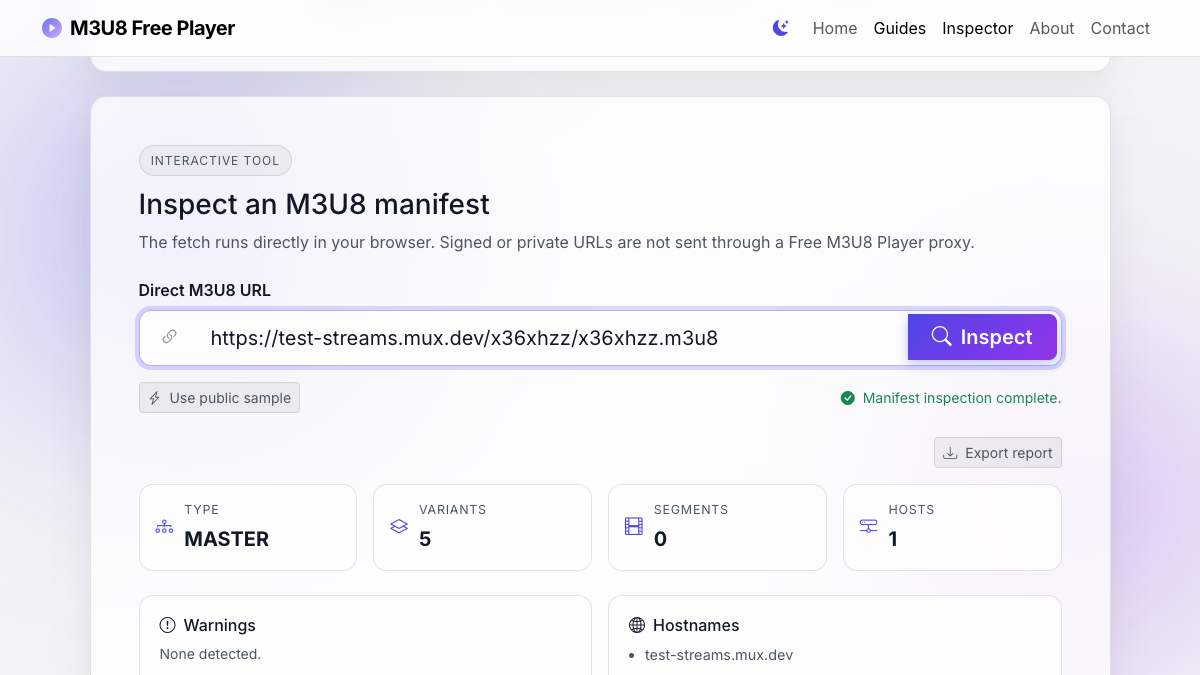
Reference-stream inspection evidence
We fetched the public Mux test manifest from this page, parsed it with the same browser code used by the tool, and checked the resulting variant, codec, hostname, and warning output. This verifies the documented workflow against a reproducible public source rather than a hand-written sample alone.
When to use a manifest inspector
Use the inspector when you have a direct .m3u8 URL and need to know what the player will discover next. A successful video test tells you the full chain works, but an inspection tells you what the chain is made of. That difference matters when you are comparing a stream that works in VLC with one that fails in Chrome, Safari, Firefox, or an embedded web player.
- Use it before debugging a blank player to confirm whether the first URL is a master playlist or a media playlist.
- Use it when a stream loads in one browser but fails in another, because codec declarations often explain browser-specific failures.
- Use it when a stream is protected by signed URLs, because child playlists, key files, subtitle playlists, and segments may expire separately.
- Use it when a CDN migration changes hostnames, redirects, or relative path behavior.
What the inspector reads
The inspector starts with the same first request a player would make. If the response is an HLS playlist, it looks for recognized playlist directives and nearby URI lines. It then groups the result into a few practical fields: type, variant count, segment count, target duration, media sequence, hostnames, codecs, keys, tracks, and warnings.
A master playlist usually contains #EXT-X-STREAM-INF entries followed by child playlist URLs. A media playlist usually contains #EXTINF segment declarations followed by media segment URLs. Both playlist types can reference additional resources, but they fail in different ways. A master playlist failure often means the player cannot even choose a rendition. A media playlist failure often means the player can choose a rendition but cannot continue downloading the timed media resources.
How to interpret the summary fields
Type
MASTER means the file points to variants. MEDIA means the file points to timed media segments. UNKNOWN means the text did not contain enough HLS structure to classify confidently.
Variants
Variants are bitrate or resolution choices. If a master playlist has no variants, the player may not know which child playlist to load next.
Segments
Segments are the media chunks in a media playlist. If segment paths resolve to a different host, that host also needs browser-compatible access rules.
Hosts
Multiple hostnames are normal in CDN setups, but they widen the debug surface. Manifest, segments, subtitles, and keys can each fail independently.
Playlist tags worth checking
HLS uses text tags to describe how playback should work. You do not need to memorize every tag to debug most browser problems. Focus on the tags that change what the player requests next.
#EXTM3U
#EXT-X-STREAM-INF:BANDWIDTH=2149280,RESOLUTION=1280x720,CODECS="avc1.64001f,mp4a.40.2"
url_0/playlist.m3u8
#EXT-X-STREAM-INF:BANDWIDTH=836280,RESOLUTION=848x480,CODECS="avc1.64001f,mp4a.40.2"
url_1/playlist.m3u8
In that small example, each #EXT-X-STREAM-INF line describes a rendition and the next line points to the child playlist. If the 720p child playlist is missing, blocked, or returns HTML instead of M3U8 text, the master playlist can look valid while playback still fails later.
#EXT-X-TARGETDURATIONsets the expected maximum segment duration in a media playlist.#EXT-X-MEDIA-SEQUENCEtells a live player where the current segment numbering begins.#EXT-X-ENDLISTmarks a playlist as finished, which usually separates VOD behavior from active live behavior.#EXT-X-KEYmeans encrypted media requires a separate key request before playback can continue.#EXT-X-MEDIAcan point to alternate audio, subtitles, or captions that introduce extra requests.
What the warnings mean
The inspector warnings are not final verdicts. They are prompts for the next check. For example, a playlist with multiple hostnames may be perfectly healthy if every hostname sends the right CORS headers and tokens. A live playlist without #EXT-X-ENDLIST is also expected. The warning matters because it tells you where to look if the player stalls or never starts.
A missing codec string is another good example. Some players can still infer enough information from media segments, but missing or inaccurate codec declarations make browser support harder to predict. If a stream works in Safari but not in Chrome, or works on desktop but fails on a mobile browser, codec and container clues become much more important.
Why browser inspection can still fail
Because the inspector fetches from the browser, it obeys browser security rules. That is intentional. A server-side proxy could fetch more URLs, but it would no longer answer the question most web developers care about: can the visitor's browser reach this stream directly? If the inspector cannot fetch a manifest, check the response status, the token, the protocol, and the CORS headers on the stream origin.
If the request is blocked by CORS in the inspector, a normal in-page HLS player is likely to hit the same boundary.
This also keeps private stream URLs safer. The tool does not upload your URL to a remote analyzer. The browser still sends the request to the stream origin, so you should avoid testing confidential links on any shared computer, but the site is not designed to collect or proxy the media.
A practical inspection workflow
- Paste the direct M3U8 URL into the homepage input.
- Click Inspect before clicking Play if you want to read the playlist structure first.
- Check whether the result is MASTER or MEDIA.
- For a master playlist, review variants, resolution, bandwidth, codecs, and child playlist paths.
- For a media playlist, review target duration, segment count, live status, key requests, and segment hostnames.
- If inspection fails, open browser DevTools and inspect the manifest request status before changing player settings.
What to do after inspection
If the manifest looks healthy and playback still fails, the next problem is usually downstream. Watch the network panel for child playlists, segment files, subtitle playlists, encryption keys, and initialization segments. A player can parse the first playlist cleanly and still fail on the second or third request.
If the inspector reports multiple hostnames, make a host-by-host checklist. The manifest host, segment host, key host, and subtitle host may each be controlled by different CDN or storage rules. If one of them omits the right headers or returns a token error, playback can stop even while the first manifest continues to look correct.
Protocol and implementation sources
- IETF RFC 8216: HTTP Live Streaming defines the playlist tags and media-playlist behavior discussed above.
- MDN: Cross-Origin Resource Sharing explains why a browser may block a manifest that another desktop player can fetch.
- hls.js API documentation documents manifest, level, and error events used by the player diagnostics.